EOS 节点搭建
EOS 节点搭建
安装 EOS
预编译二进制文件安装
wget https://github.com/EOSIO/eos/releases/download/v1.5.0/eosio_1.5.0-1-ubuntu-16.04_amd64.deb

apt install ./eosio_1.5.0-1-ubuntu-16.04_amd64.deb
这样 eos 的执行文件就在 /usr/opt/eosio/1.5.0/bin/ 目录下。
源码安装
git clone https://github.com/EOSIO/eos --recursive
cd eos
git checkout v1.5.0
git submodule update --init --recursive
./eosio_build.sh
接下来会检查各种依赖包的安装情况,然后询问是否安装缺失依赖,选择 yes。
然后就等待长时间的编译,安装。
安装 Jungle2.0 测试网节点
自动脚本安装
自动脚本安装说明 https://github.com/EOS-Jungle-Testnet/Node-Auto-installation
填写注册信息
之后安装指示一步步操作就可以了。Jungle 模式的同步会下载一份历史块数据文件,这样能更快的同步到最新区块。
安装正式环境同步节点
克隆 CryptoLions 的正式环境配置仓库
# 假如我需要把节点内容放在 /eos 里。
cd /eos
git clone https://github.com/CryptoLions/EOS-MainNet.git ./
# 调整权限
chmod -R 777 ./*.sh
chmod -R 777 ./Wallet/*.sh
因为这些脚本默认的安装目录在 /opt/EosmainNet,和我设置的不一样,我需要把 cleos.sh, start.sh, stop.sh, Wallet/start_wallet.sh, Wallet/stop_wallet.sh 这几个文件里的路径都改掉。
指定 genesis.json 文件
我之前有次启动发现链的 id 与正式环境的并不相同,所以就指定了 genesis.json 文件。在 /eos/start.sh 里给 nodeos 添加启动参数 nodeos --genesis-json /eos/genesis.json
然后 ./start.sh 启动节点。日志在 stderr.txt 里。启动成功就可以看到日志里真在同步块了。
执行 curl http://127.0.0.1:8888/v1/chain/get_info 如果看到结果如下
{
  "server_version": "ea08cfd3",
  "chain_id": "aca376f206b8fc25a6ed44dbdc66547c36c6c33e3a119ffbeaef943642f0e906",
  "head_block_num": 2419,
  "last_irreversible_block_num": 2418,
  "last_irreversible_block_id": "00000972cbd9fef42d781baaced83abc26f26767d8f27f4380b7dec7a7ed2762",
  "head_block_id": "0000097310faf39ebe9a664e0f99ac882cd3b607cc1a8722ba4c48f6551983e3",
  "head_block_time": "2018-06-09T12:18:22.500",
  "head_block_producer": "eosio",
  "virtual_block_cpu_limit": 733745732,
  "virtual_block_net_limit": 11777754,
  "block_cpu_limit": 100000000,
  "block_net_limit": 1048576,
  "server_version_string": "v1.5.0"
}
这个 chain_id 就是正式环境的 chain id。
修改默认的钱包配置文件地址
默认的钱包配置文件地址在 ~/eosio-wallet,我需要修改到指定的位置,在 /eos/Wallet/start_wallet.sh 里的 keosd 的启动参数加上 --config-dir /eos/xxx 就好。
然后启动 Wallet/start_wallet.sh 就好了。
这里启动遇到了一个 unix socket service failed to start: No such file or directory 的错误,在 keosd 的配置文件里将 unix-socket-path 的地址写上绝对路径就可以了。
其他
启动本机单节点测试网络
执行 nodeos --help 可以查看帮助说明。
执行下面的命令启动本地节点
./nodeos -e -p eosio --plugin eosio::chain_api_plugin --plugin eosio::history_api_plugin
报错 “database dirty flag set (likely due to unclean shutdown”
如果遇到这个错误,删掉下面这个文件夹即可
Mac OS: ~/Library/Application Support/eosio/nodeos/data
Linux: ~/.local/share/eosio/nodeos/data
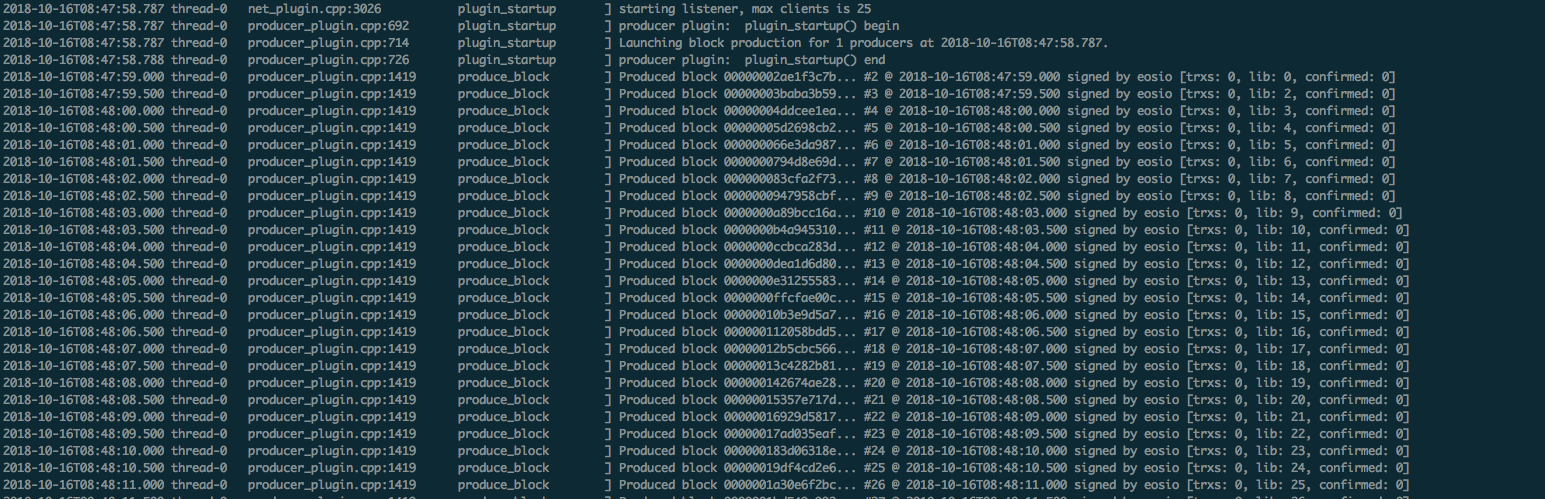
启动成功后就能看到生产区块的输出了。因为没有交易所以每个 trxs 都是 0。
执行的输出如下
eos 相关二进制文件说明
编译完成后可以在 build 目录下找到 program 目录。如果是直接安装的二进制文件就是在 /usr/opt/eosio/1.5.0/bin 下。里面是编译出来的可执行程序。分别有一下二进制文件。
nodeos: 区块链服务器节点生成组建
cleos: 和区块链交互的接口命令
keosd: EOS 钱包
eosio-launcher:节点网络组成和部署的应用
nodeos
eos 的核心守护进程,运行时可以添加参数来配置插件。
cleos
nodeos 的客户端,用来和 nodeos 提供的 REST API 交互。
./cleos 不带任何参数则显示帮助文档。
create 用来创建各种对象,比如 account, key, producer
get 获取 create 创建的对象的信息
set 一个对区块链的吸入操作,部署智能合约,修改智能合约。
transfer 转账,account 和 account 之间互转 eos。
net
wallet 和本地钱包交互
sign 对交易进行签名
push 把交易发送到区块链上。
keosd
eos 钱包的守护进程。启动这个进程之后可以用 cleos wallet 与其交互。
luncher
用来创建多节点区块链。nodeos 用来创建单节点区块链。
报错 “Error 3090003: Provided keys, permissions, and delays do not satisfy declared authorizations transaction declares authority”
错误提示
Error 3090003: Provided keys, permissions, and delays do not satisfy declared authorizations
transaction declares authority '{"actor":"lailyadmin22","permission":"active"}', but does not have signatures for it.
原因是需要签名的账户的 owner key 或者 active key 不在打开的钱包里,或者操作的智能合约的拥有者的 key 不在。
这种情况下需要添加签名的账户的 key 或者添加 eosio 账户的 private key。
eosio public key: EOS6MRyAjQq8ud7hVNYcfnVPJqcVpscN5So8BhtHuGYqET5GDW5CV
eosio private key: 5KQwrPbwdL6PhXujxW37FSSQZ1JiwsST4cqQzDeyXtP79zkvFD3
注意,这只是测试环境的
主网/测试网信息
主网
区块链浏览器 http://eosnetworkmonitor.io/#home
EOSTEA : https://eosmonitor.io/
EOSpark: https://eospark.com/
测试网
Jungle Testnet:http://jungle.cryptolions.io/
EOSTEA:https://party.eosmonitor.io/
eos 主网 rpc 地址
EOS New York: https://api.eosnewyork.io
eos DAC: https://eu2.eosdac.io
主网的 chain id
aca376f206b8fc25a6ed44dbdc66547c36c6c33e3a119ffbeaef943642f0e906
测试链的 chain id
038f4b0fc8ff18a4f0842a8f0564611f6e96e8535901dd45e43ac8691a1c4dca
eos 配置文件说明
https://developers.eos.io/eosio-nodeos/docs/configuration-file
报错:_S_create_c_locale name not valid
加上 export LC_ALL=“C”
报错: block log can not be found
clear this folder
Mac OS: ~/Library/Application Support/eosio/nodeos/data
Linux: ~/.local/share/eosio/nodeos/data
get transaction 总是空的
在启动nodeos时,添加参数:--filter-on "*"
常见错误
http://blog.eosdata.io/index.php/2018/07/20/eos_errorcode/